
At the end of Part 3, Nimbus got close. A customer asked for a refund on order #1042; Nimbus checked the policy, found the order eligible, wanted to open a refund ticket… and stopped:
  · Model requested: check_refund_eligibility({"order_id":1042})
  · PHP ran it: {...,"eligible":true,...}
  · Model asked for another tool — the loop comes in Part 4.
Sorry, that needs more steps than I can handle yet.
The model knew what to do next. Our code just didn’t let it. That’s what we fix now. In this part we build the agent loop in PHP: Nimbus calls tools, looks at the results and decides again, as many times as the task needs. We also add the safety features every loop needs, so it can’t run forever, crash on a database error, or fail silently when the API is busy.

Before you start
- What you’ll build: a multi-step agent loop with a step limit, a repeated-call guard, safe tool errors, API retries and run logs.
- You need: everything from Part 3 (three tools and the
ticketstable).- Code for this part: GitHub →
part-04🔀 Gemini or OpenAI? The code for this series comes in two versions:
Gemini Setup(free tier, recommended for learning) andOpenAI Setup(paid). The agent logic is the same in both. Only the small layer that talks to the AI provider differs, because each provider formats tool calls slightly differently, so the code may vary a bit between the two. Model names and free-tier limits change often: check.env.examplefor the current defaults.
What an agent loop is
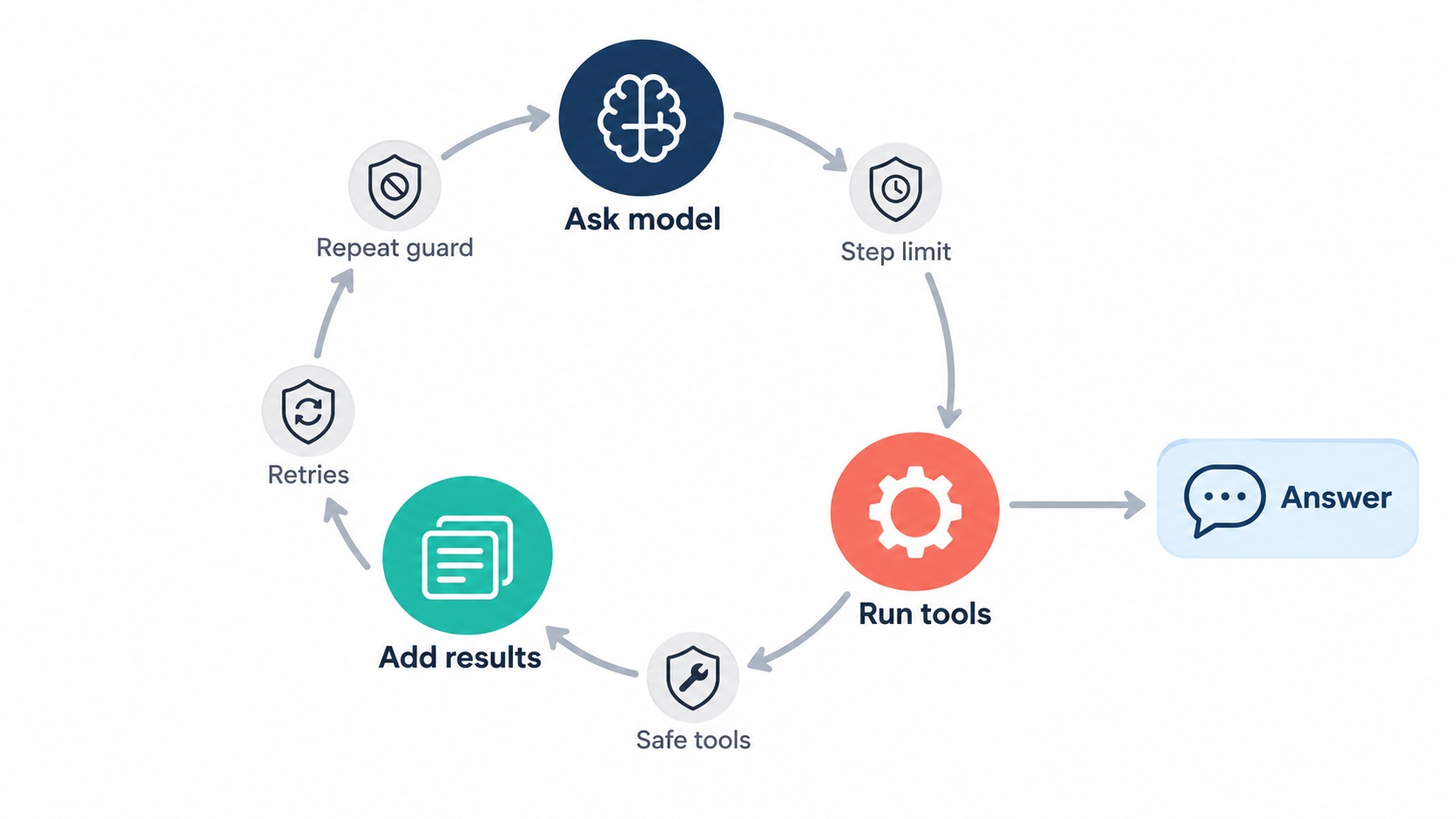
In Part 1 we described an agent in four words: decide, act, observe, answer. Until now we’ve run that sequence once. An agent loop repeats the first three until the model decides it has enough to answer:
repeat:
    ask the model (with the history so far)
    if it answered in plain text → done
    otherwise → run the tools it asked for, add the results to the history
That’s the whole idea, and it’s what turns a chatbot with tools into an agent. The model plans one step at a time, based on what it has learned so far. We never write "first check, then open a ticket" in code: the model works that out from the system prompt and from each tool result.
Two terms we’ll use:
- Step: one call to the model plus any tools it requests in that reply.
- History: the growing list of messages: the question, each tool request, each tool result. The model sees all of it on every step, which is how it "remembers" what it already did within one question.
Why a loop needs brakes
A loop that only stops when the model says so is risky. The model might:
- keep calling tools without ever answering (each call costs money and time);
- call the same tool with the same arguments over and over;
- trigger a PHP error, such as a database exception, that crashes the script halfway;
- hit a temporary API error, especially a rate limit: a cap on how many requests you can make per minute or per day. Gemini’s free tier has low rate limits, and an agent loop makes several requests per question.
So our loop gets four brakes: a step limit, a repeated-call guard, safe tool execution and automatic retries. It also gets a trace, so when something does go wrong, you can see exactly what happened.
Build it
The part-04 folder reuses all the tools from Part 3 unchanged: tools.php, refunds.php, tickets.php, orders.php, plus the schema and helpers. The changes are in agent.php (the loop), a new trace.php, and a small addition to each provider’s llm.php.
Step 1: The loop
Here’s the new agent.php. Read it top to bottom; the comments mark the four parts of each step.
<?php
// agent.php — the agent LOOP: ask → run tools → ask again … until the model
// answers in plain text, or we hit a safety limit.

const SYSTEM_PROMPT = <<<TXT
You are Nimbus HelpDesk AI, the support assistant for Nimbus, a project-management SaaS.
Use the available tools whenever you need real data. Never guess order details,
dates or refund decisions: the tools are the source of truth.
If the customer hasn't given an order number and you need one, ask for it. Never invent one.
You cannot issue refunds yourself. For a refund request: check eligibility first.
If eligible, open a refund ticket so the team can process it. If not, explain the reason.
After opening a ticket, always give the customer the ticket number.
If a tool returns an error, don't retry it blindly: explain the problem or ask the customer.
Keep answers brief and friendly.
TXT;

const MAX_STEPS        = 6;   // model calls per question, at most
const MAX_REPEAT_CALLS = 2;   // same tool + same arguments, at most

// Run a tool without letting a PHP error crash the whole agent.
// The model gets a short, safe message; the real error goes to the log.
function safeRunTool(int $step, string $name, array $args): array {
    try {
        return runTool($name, $args);
    } catch (Throwable $e) {
        traceEvent($step, 'tool_exception', ['tool' => $name, 'error' => $e->getMessage()],
            "PHP error in $name: " . $e->getMessage());
        return ['error' => 'The tool failed because of an internal problem. Please try again later.'];
    }
}

function runAgent(string $question, int $maxSteps = MAX_STEPS): string {
    traceStart($question);
    $tools    = toolDefinitions();
    $messages = [
        ['role' => 'system', 'content' => SYSTEM_PROMPT],
        ['role' => 'user',   'content' => $question],
    ];
    $callCounts = [];

    for ($step = 1; $step <= $maxSteps; $step++) {

        // 1. Ask the model what to do next.
        $started = microtime(true);
        try {
            $reply = chatWithTools($messages, $tools);
        } catch (RuntimeException $e) {
            traceEvent($step, 'api_error', ['error' => $e->getMessage()], 'API error: ' . $e->getMessage());
            $answer = "Sorry, I'm having trouble right now. Please try again in a moment.";
            traceEnd($answer, 'api_error');
            return $answer;
        }
        $ms = (int) round((microtime(true) - $started) * 1000);

        // 2. No tool calls → the model has given its final answer. Done.
        if (empty($reply['tool_calls'])) {
            $answer = $reply['text'] ?: "Sorry, I couldn't come up with an answer. Could you rephrase?";
            traceEvent($step, 'final_answer', ['ms' => $ms], "model answered ({$ms} ms)");
            traceEnd($answer, 'answered');
            return $answer;
        }

        // 3. Otherwise run every tool it asked for, and add the results to the history.
        $messages[] = $reply['message'];

        foreach ($reply['tool_calls'] as $call) {
            $argsJson = json_encode($call['arguments']);
            traceEvent($step, 'tool_call', ['tool' => $call['name'], 'arguments' => $call['arguments'], 'ms' => $ms],
                "model → {$call['name']}($argsJson) ({$ms} ms)");

            // Guard against loops: the same call with the same arguments, again and again.
            $key = $call['name'] . $argsJson;
            $callCounts[$key] = ($callCounts[$key] ?? 0) + 1;

            if ($callCounts[$key] > MAX_REPEAT_CALLS) {
                $result = ['error' => 'You already made this exact call. Use the earlier result.'];
            } else {
                $result = safeRunTool($step, $call['name'], $call['arguments']);
            }
            traceEvent($step, 'tool_result', ['tool' => $call['name'], 'result' => $result],
                "PHP  ← " . json_encode($result));

            $messages[] = [
                'role'         => 'tool',
                'tool_call_id' => $call['id'],
                'name'         => $call['name'],
                'content'      => json_encode($result),
            ];
        }
        // …and go round again: the model sees the results and decides the next step.
    }

    // 4. Safety limit reached. Stop instead of looping (and spending) forever.
    $answer = "Sorry, this is taking more steps than I expected. "
            . "Please contact our support team and they'll sort it out.";
    traceEvent($maxSteps, 'step_limit', [], "stopped: reached the step limit ($maxSteps)");
    traceEnd($answer, 'step_limit');
    return $answer;
}
The key line is the for loop. Each pass asks the model for its next move. If it replies with text (no tool calls), that’s the answer and we return. If it requests tools, we run them, add the results to $messages and go round again. The model sees the new results and decides the next step.
The system prompt gained one line: "If a tool returns an error, don’t retry it blindly: explain the problem or ask the customer." With a loop, a model that keeps retrying a failing tool would burn through steps.
Now the brakes:
Step limit (MAX_STEPS = 6). The loop can call the model at most six times per question. Our refund flow needs three (check → ticket → answer), so six leaves room without allowing runaway costs. When the limit is reached, Nimbus stops and points the customer to the support team instead of looping.
Repeated-call guard (MAX_REPEAT_CALLS = 2). We count each tool name + arguments combination. On the third identical call, PHP doesn’t run the tool; it returns "You already made this exact call. Use the earlier result." This nudges the model forward instead of letting it loop on the same lookup.
Safe tool execution (safeRunTool()). If a tool throws an exception, for example because the database is down, we catch it. The real error goes to the log; the model receives a short, safe message. Two reasons: the agent keeps running and can apologise properly, and internal details like table names or SQL errors never reach the model or the customer.
API errors. If the provider call fails completely (after retries, see Step 3), the loop catches the RuntimeException, logs it and returns a polite "please try again" message instead of a PHP stack trace.
⚠️ Gotcha: The step limit counts model calls, not tool calls. One step can include several tools if the model requests them together, like checking two orders at once. If you need to cap total tool calls too, count them inside the
foreach.
Step 2: Trace every run
When an agent gives a wrong answer, the question is always "what did it decide, and what did it see?" trace.php records each event on screen and appends the whole run, as one line of JSON, to a daily log file:
<?php
// trace.php — record every step of a run: on screen AND in a log file.
// Each run is one line of JSON in logs/agent-YYYY-MM-DD.jsonl, so you can
// go back and see exactly what the agent decided, and why.

function traceStart(string $question): void {
    $GLOBALS['TRACE'] = [
        'run_id'   => date('Ymd-His') . '-' . bin2hex(random_bytes(3)),
        'started'  => date('c'),
        'question' => $question,
        'events'   => [],
    ];
}

// Add an event and print a one-line summary to the terminal (STDERR).
function traceEvent(int $step, string $type, array $data, string $summary): void {
    $GLOBALS['TRACE']['events'][] = ['step' => $step, 'type' => $type] + $data;
    fwrite(STDERR, "  [step $step] $summary\n");
}

function traceEnd(string $answer, string $outcome): void {
    $trace = $GLOBALS['TRACE'] + ['answer' => $answer, 'outcome' => $outcome, 'finished' => date('c')];

    $dir = __DIR__ . '/logs';
    if (!is_dir($dir)) {
        mkdir($dir, 0775, true);
    }
    file_put_contents($dir . '/agent-' . date('Y-m-d') . '.jsonl',
        json_encode($trace, JSON_UNESCAPED_SLASHES) . "\n", FILE_APPEND);

    fwrite(STDERR, "  [done] outcome: $outcome · run_id: {$trace['run_id']}\n");
}
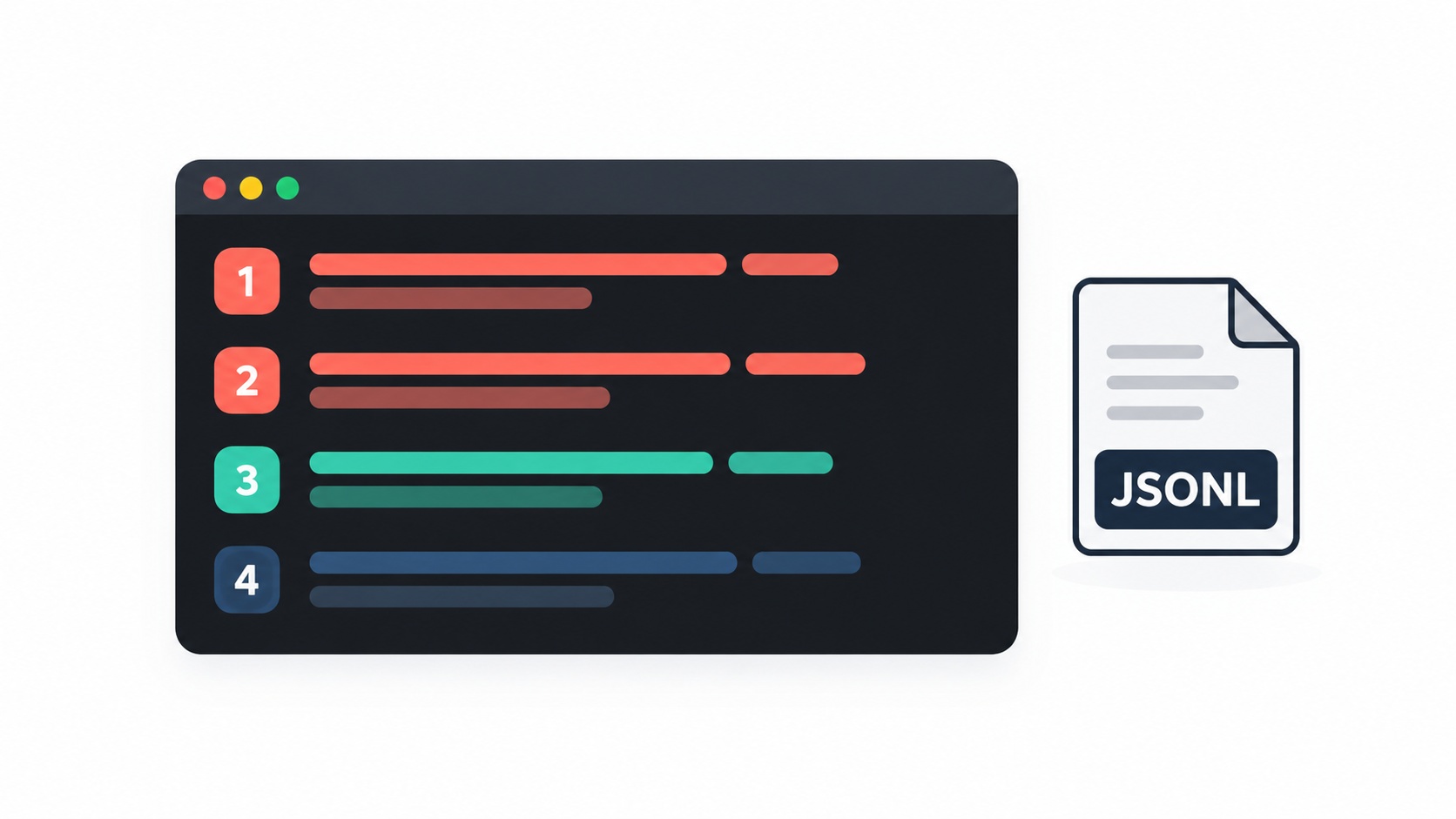
This format, one JSON object per line, is called JSONL. It’s easy to append to, easy to read back in PHP, and easy to load into other tools later. Each run gets a run_id, the question, every event and the final outcome: answered, step_limit or api_error.
A small helper, show-trace.php, replays recent runs from today’s log, so you can review what happened after the fact:
php show-trace.php      # the last run
php show-trace.php 3    # the last three runs
💡 Tip: The log includes every tool argument and result, which in a real system may contain customer data. Keep the
logs/folder out of Git (the repo’s.gitignorealready does this) and out of your web root.
Step 3: Retry temporary API errors
Both providers sometimes return temporary errors: 429 when you’ve hit a rate limit, 500 or 503 when they’re overloaded. These usually succeed if you wait and try again. So each provider’s llm.php now sends requests through a small helper, httpPostJson(), which retries up to three times, waiting 2, 4 and then 8 seconds:
// part-04/llm.php (excerpt, identical for Gemini and OpenAI)
// POST JSON with automatic retries for temporary errors:
// 429 = rate limit (common on free tiers), 500/503 = provider busy.
// Waits 2s, 4s, 8s between attempts, then gives up.
function httpPostJson(string $url, array $headers, array $payload): array {
    $maxAttempts = 4;
    for ($attempt = 1; $attempt <= $maxAttempts; $attempt++) {
        $ch = curl_init($url);
        curl_setopt_array($ch, [
            CURLOPT_RETURNTRANSFER => true,
            CURLOPT_HTTPHEADER     => $headers,
            CURLOPT_POSTFIELDS     => json_encode($payload),
            CURLOPT_TIMEOUT        => 60,
        ]);
        $response = curl_exec($ch);
        $status   = curl_getinfo($ch, CURLINFO_HTTP_CODE);
        $error    = curl_error($ch);
        curl_close($ch);

        $temporary = $response === false || in_array($status, [429, 500, 503], true);
        if (!$temporary || $attempt === $maxAttempts) {
            if ($response === false) {
                throw new RuntimeException("Request failed: $error");
            }
            return json_decode($response, true) ?? [];
        }
        $wait = 2 ** $attempt;                       // 2, 4, 8 seconds
        fwrite(STDERR, "  · API returned " . ($status ?: 'no response') . ", retrying in {$wait}s...\n");
        sleep($wait);
    }
    return [];
}
Doubling the wait each time is called exponential backoff. It gives the provider time to recover instead of hammering it with instant retries.
🔀 Provider difference: None this time.
httpPostJson()is identical in bothllm.phpfiles; only the URL and headers passed to it differ. The retry rules are the same because both providers use standard HTTP status codes.
⚠️ Gotcha (Gemini free tier): Retries help with short per-minute limits. They can’t fix a daily limit: once that’s used up, every retry gets another 429. If you see three retries and then an error, switch
GEMINI_CHAT_MODELin.envto a Flash-Lite model, which has a higher free daily limit.
Step 4: Try a lower limit from the command line
ask-agent.php loads trace.php and accepts a new flag, --max-steps=N, so you can watch the step limit work without editing code:
php ask-agent.php --max-steps=1 "Please refund order #1042."
Prompt spotlight: who decides the order of steps?
Notice what’s not in our code: there’s no if eligible then create ticket. The sequence comes from two sentences in the system prompt:
For a refund request: check eligibility first. If eligible, open a refund ticket so the team can process it. If not, explain the reason.
and from the tool results the model sees. This is the core trade-off of agents:
- Prompt-driven steps (what we do here) handle variety well. The same agent copes with "refund 1042", "refund 1042 and 1043" and "is 1043 refundable? if so open a ticket", without new code.
- Code-driven steps (a fixed
ifsequence) are more predictable but only handle the cases you wrote.
For rules that must never be broken, such as the 14-day window, we keep using code: the eligibility tool decides, not the model. For the order of steps, the prompt is enough, and the trace lets us verify the model follows it.
Try it
The request that stopped in Part 3:
php ask-agent.php "Please refund order #1042."
  [step 1] model → check_refund_eligibility({"order_id":1042}) (812 ms)
  [step 1] PHP  ← {"order_id":1042,"amount":"240.00 USD","status":"paid","days_since_purchase":3,"refund_window_days":14,"eligible":true,"reason":"Paid and within the refund window (11 days left)."}
  [step 2] model → create_support_ticket({"category":"refund","summary":"Customer requests a refund for order 1042 (Pro annual, $240). Eligible: purchased 3 days ago.","order_id":1042}) (1034 ms)
  [step 2] PHP  ← {"created":true,"ticket_id":5001,"status":"open"}
  [step 3] model answered (690 ms)
  [done] outcome: answered · run_id: 20261021-134512-a1b2c3
Good news! Order #1042 is eligible for a refund. I've opened ticket #5001, and our
team will process your $240.00 refund shortly.
Three steps, each one based on the last. The ticket summary even includes the facts the model checked in step 1.
Two orders with different outcomes:
php ask-agent.php "Can I get refunds for orders 1042 and 1043?"
  [step 1] model → check_refund_eligibility({"order_id":1042}) (905 ms)
  [step 1] PHP  ← {...,"eligible":true,...}
  [step 1] model → check_refund_eligibility({"order_id":1043}) (905 ms)
  [step 1] PHP  ← {...,"eligible":false,"reason":"Purchased 20 days ago; refunds are only possible within 14 days."}
  [step 2] model → create_support_ticket({"category":"refund","summary":"Refund request for order 1042 (eligible, 3 days old).","order_id":1042}) (980 ms)
  [step 2] PHP  ← {"created":false,"ticket_id":5001,"message":"An open ticket already exists for this order and issue."}
  [step 3] model answered (720 ms)
  [done] outcome: answered · run_id: 20261021-134601-d4e5f6
Order #1042 is eligible, and your refund request is already open as ticket #5001.
Order #1043 isn't eligible: it was purchased 20 days ago, and refunds are only
possible within 14 days.
Both checks ran in one step, one ticket was needed, and Part 3’s duplicate protection reused the existing ticket instead of opening a second one.
The step limit in action:
php ask-agent.php --max-steps=1 "Please refund order #1042."
  [step 1] model → check_refund_eligibility({"order_id":1042}) (798 ms)
  [step 1] PHP  ← {...,"eligible":true,...}
  [step 1] stopped: reached the step limit (1)
  [done] outcome: step_limit · run_id: 20261021-134655-0718aa
Sorry, this is taking more steps than I expected. Please contact our support team and they'll sort it out.
And replaying the runs afterwards:
php show-trace.php 2
=== 20261021-134601-d4e5f6 · answered ===
Q: Can I get refunds for orders 1042 and 1043?
  step 1  tool_call       check_refund_eligibility({"order_id":1042}) 905 ms
  step 1  tool_result     {"order_id":1042,...,"eligible":true,...}
  ...
A: Order #1042 is eligible, and your refund request is already open as ticket #5001. ...
Recap
- An agent loop repeats ask → run tools → add results until the model answers in plain text. The model plans one step at a time from the results it sees.
- Every loop needs brakes: a step limit, a repeated-call guard, safe tool execution and retries with exponential backoff for 429/500/503 errors.
- Errors become data for the model (short and safe) and details for the log, never stack traces for the customer.
- A trace of every run (on screen and in a JSONL log) is how you debug and review an agent.
- The order of steps can come from the prompt; rules that must never break stay in code.
Next, Part 5: RAG + Tools Together. Nimbus can act, but it has forgotten everything from the RAG series. We make knowledge-base search one of its tools, so it can answer policy questions and act on orders in the same conversation.
Frequently Asked Questions
An agent loop is code that repeatedly sends the conversation to an AI model, runs any tools the model requests, adds the results to the conversation, and asks again, until the model replies with a final answer. It lets an AI agent complete tasks that need several steps.
Enough for your longest normal task, plus a small margin. Our longest flow needs three model calls, so we allow six. A limit protects you from runaway costs and endless loops; when it’s reached, hand over to a human instead of failing silently.
Use a hard step limit, detect repeated identical tool calls, and tell the model in the system prompt not to retry failing tools blindly. Log every run so you can spot patterns and improve tool descriptions.
Retry with exponential backoff: wait a little, then double the wait on each attempt, and give up after a few tries. This handles per-minute limits. Daily limits need a different model or a paid plan, because retrying won’t help.
JSONL stores one complete run per line, so it’s easy to append to and easy to read back. A log of each run’s decisions, tool results and outcome is the best way to debug wrong answers and to build the evaluation set we’ll use in Part 8.
Full code for this part: GitHub → Gemini Setup/part-04 · OpenAI Setup/part-04
