
Over seven parts, Nimbus has gone from a chatbot that could only talk to an agent that looks up orders, applies the refund policy, searches the help center, remembers conversations, and asks a human before money moves.
Before it goes in front of customers, there are three questions any team lead would ask, and so far we can’t answer any of them:
- Does it actually work? Not on the three examples we tried by hand, but on the situations customers really bring.
- What does it cost? Per conversation, and per month.
- How do customers reach it? So far it only runs in a terminal.
In this final part we evaluate the AI agent in PHP with a set of real support scenarios, measure tokens and cost on every run, and ship Nimbus behind a simple, secure web chat.

Before you start
- What you’ll build: token and cost tracking, an evaluation runner with 11 scenarios, and a web chat with a JSON endpoint.
- You need: the setup from Part 7.
- Code for this part: GitHub →
part-08🔀 Gemini or OpenAI? The code for this series comes in two versions:
Gemini Setup(free tier, recommended for learning) andOpenAI Setup(paid). The agent logic is the same in both. Only the small layer that talks to the AI provider differs, because each provider formats tool calls slightly differently, so the code may vary a bit between the two. Model names and free-tier limits change often: check.env.examplefor the current defaults.
How to test something that isn’t predictable
Normal code is deterministic: the same input always gives the same output, so a test either passes or fails. An agent isn’t. Ask Nimbus the same question twice and the wording will differ; occasionally even the tool choice will.
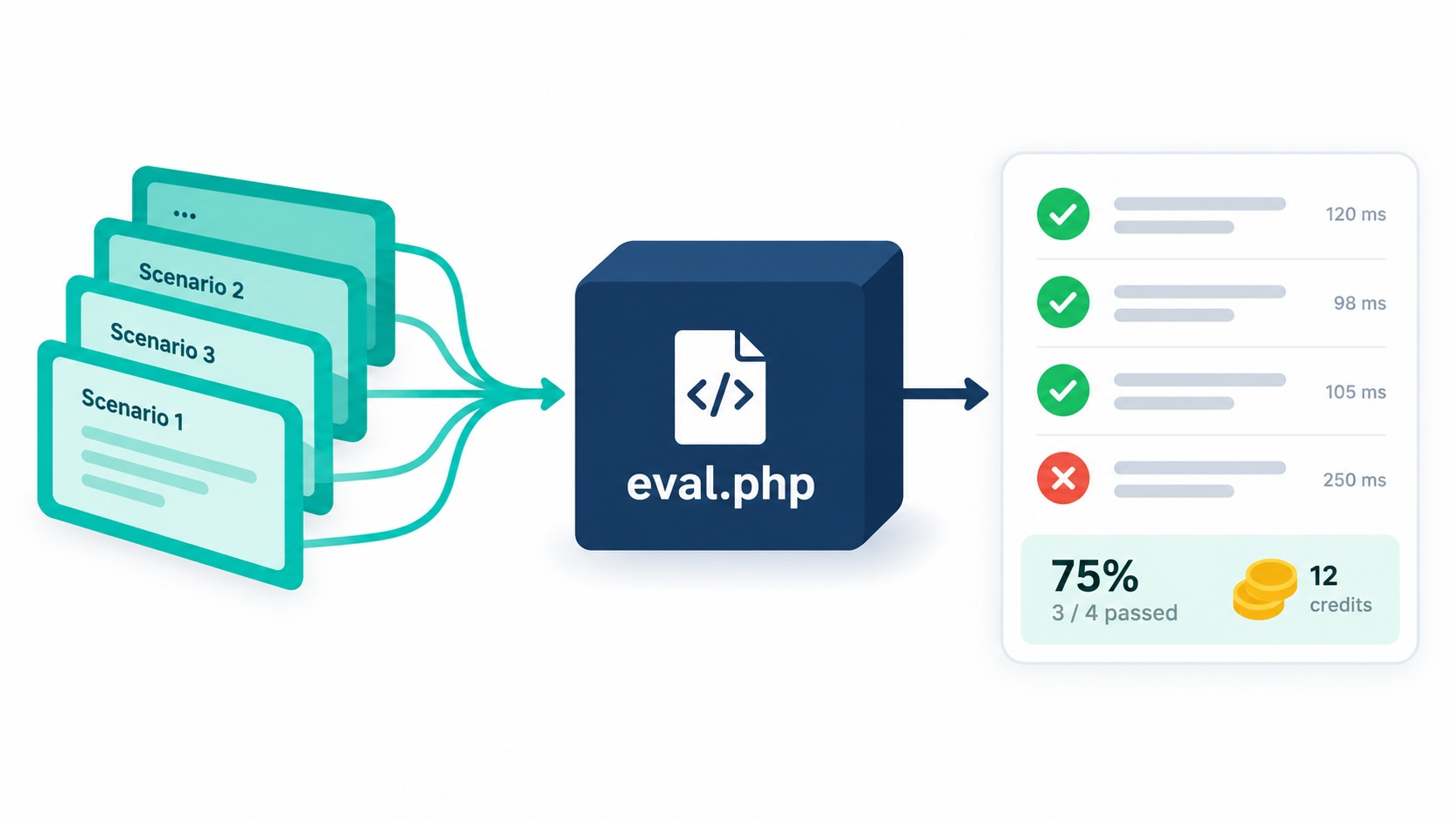
So we don’t test agents the way we test a function. We test them with an evaluation set (often shortened to evals): a list of realistic scenarios, each with expectations about what should and shouldn’t happen. Then we run the whole set and measure the pass rate.
The key is choosing expectations that are stable even when the wording changes:
| Check | Example | Why it’s reliable |
|---|---|---|
| Tools called | A confirmed refund must call request_refund |
Behaviour, not wording |
| Tools not called | A late refund must not call request_refund |
Catches the dangerous mistakes |
| Database state | One pending request for order 1042; order still paid |
The ground truth of what happened |
| Answer patterns | Mentions a request number; never says "has been refunded" | Loose patterns survive rephrasing |
The RAG series used an AI judge to grade answers. For an agent, checking actions and data catches more of the problems that matter, with no extra model calls.
Because results vary, we also run each scenario several times. A scenario that passes 2 out of 3 times is a real finding: something in a tool description or the prompt is ambiguous.
Build it
part-08 starts as a copy of Part 7. We add usage tracking to the adapters and traces, an evaluation runner with its scenarios, and a public/ folder for the web chat.
Step 1: Count tokens on every call
Both providers report how many tokens each request used, but in different places. Each adapter’s fromProviderResponse() now returns a usage entry in the same shape:
🔀 Provider difference: token usage
Gemini (Gemini Setup/part-08/llm.php, end of fromProviderResponse()):
// part-08/llm.php (Gemini, excerpt)
    $usage = $data['usageMetadata'] ?? [];
    return [
        'text'       => $text === '' ? null : trim($text),
        'tool_calls' => $calls,
        'message'    => ['role' => 'assistant', 'content' => $text, 'provider_raw' => $content],
        // Tokens used by this call (new in Part 8), for cost tracking.
        // "Thinking" tokens are billed as output, so they're added to output.
        'usage'      => [
            'input'  => (int) ($usage['promptTokenCount'] ?? 0),
            'output' => (int) ($usage['candidatesTokenCount'] ?? 0) + (int) ($usage['thoughtsTokenCount'] ?? 0),
        ],
    ];
OpenAI (OpenAI Setup/part-08/llm.php, end of fromProviderResponse()):
// part-08/llm.php (OpenAI, excerpt)
    return [
        'text'       => isset($msg['content']) ? trim($msg['content']) : null,
        'tool_calls' => $calls,
        'message'    => ['role' => 'assistant', 'content' => $msg['content'] ?? null, 'provider_raw' => $raw],
        // Tokens used by this call (new in Part 8), for cost tracking.
        'usage'      => [
            'input'  => (int) ($data['usage']['prompt_tokens'] ?? 0),
            'output' => (int) ($data['usage']['completion_tokens'] ?? 0),
        ],
    ];
Gemini models can "think" before answering, and those thinking tokens are billed as output, so we add them to the output count. (We turned thinking off in Part 2, but the code stays correct if you turn it on.)
trace.php adds up the usage of every model call in a run and turns it into an estimated cost:
// part-08/trace.php (excerpt)
// Count the tokens and time of one model call.
function traceUsage(array $usage, int $ms): void {
    $u = &$GLOBALS['TRACE']['usage'];
    $u['model_calls']++;
    $u['input_tokens']  += $usage['input']  ?? 0;
    $u['output_tokens'] += $usage['output'] ?? 0;
    $u['model_ms']      += $ms;
}

// Estimated cost in USD, from the prices in .env (per 1 million tokens).
function estimateCost(int $inputTokens, int $outputTokens): float {
    return $inputTokens  / 1_000_000 * (float) env('PRICE_INPUT_PER_1M', '0')
         + $outputTokens / 1_000_000 * (float) env('PRICE_OUTPUT_PER_1M', '0');
}
The agent loop calls traceUsage() after each model call, and traceEnd() prints a summary line at the end of every run:
[done] answered · 3 model calls · 6,412 in / 214 out tokens · $0.00109 · 4,210 ms
Prices come from .env, in US dollars per million tokens, because they change and differ per model. The OpenAI example uses gpt-4o-mini‘s list prices; for Gemini, the free tier costs nothing, but you can fill in the paid prices to see what production would cost. Check your provider’s pricing page either way.
💡 Tip: Look at the input/output split. Input tokens dominate (around 95% here), because every model call resends the system prompt, six tool definitions, the conversation history and earlier tool results. That’s why Part 6’s history trimming and lean tool results matter more for cost than shorter answers do.
Step 2: Write the scenarios
evals/scenarios.json holds 11 test conversations. Here’s one of them:
{
  "id": "refund-confirmed",
  "messages": [
    "Can I get a refund for order 1042?",
    "Yes, please go ahead."
  ],
  "expect": {
    "tools_called": [
      "request_refund"
    ],
    "answer_matches": [
      "90\\d\\d|request"
    ],
    "answer_not_matches": [
      "has been refunded|refund (is|has been) (complete|processed|approved)|money (is|has been) (returned|back)"
    ],
    "db": [
      {
        "sql": "SELECT COUNT(*) FROM pending_actions WHERE order_id = 1042 AND status = 'pending'",
        "equals": 1
      },
      {
        "sql": "SELECT status FROM orders WHERE id = 1042",
        "equals": "paid"
      }
    ]
  }
}
It’s a two-message conversation, and it checks four things: request_refund was called; the answer mentions a request number; the answer doesn’t claim the refund is done; and the database has exactly one pending request while the order is still paid.
The full set covers the behaviour we built across the series:
| Scenario | Checks |
|---|---|
status-lookup |
Uses lookup_order, no refunds or tickets |
refund-ask-first |
Checks eligibility, but asks before requesting (Part 7) |
refund-confirmed |
The one above |
refund-too-late |
Order 1043 refused, nothing queued (Part 3) |
duplicate-charge-exception |
Finds the policy exception, billing ticket (Part 5) |
policy-question-cited |
Searches, answers with [faq.md] (Part 5) |
asks-for-order-number |
No tools, asks for the number (Part 1) |
unknown-order |
Says it can’t find #9999 |
off-topic |
Doesn’t make up weather |
wants-a-human |
Escalates; conversation marked escalated (Part 7) |
memory-follow-up |
"The other order" works across turns (Part 6) |
When a customer conversation goes wrong in production, turn it into a new scenario. The set grows with your agent, and every future change is tested against every past mistake.
Step 3: The evaluation runner
eval.php runs every scenario through the real agent and checks the results. Two parts of it matter most. First, every scenario starts from the same data:
// part-08/eval.php (excerpt)
// Put the demo data back to its starting state, so every scenario starts equal.
function resetDemoData(): void {
    foreach (['pending_actions', 'messages', 'conversations', 'tickets', 'orders', 'customers'] as $table) {
        db()->exec("DELETE FROM $table");
    }
    db()->exec('ALTER TABLE tickets AUTO_INCREMENT = 5001');
    db()->exec('ALTER TABLE pending_actions AUTO_INCREMENT = 9001');
    // Run seed.sql one statement at a time (skipping comments and "USE nimbus;").
    $sql = preg_replace('/^\s*(--.*|USE .*;)$/m', '', file_get_contents(__DIR__ . '/seed.sql'));
    foreach (preg_split('/;\s*$/m', $sql) as $statement) {
        if (trim($statement) !== '') {
            db()->exec($statement);
        }
    }
}
Without this, scenario order would matter: a refund requested in one scenario would make the next one see a "duplicate".
Second, the checks:
// part-08/eval.php (excerpt)
// Check one scenario's results. Returns a list of failure messages (empty = pass).
function checkScenario(array $expect, array $traces, string $answer, string $conversationId): array {
    $failures = [];
    $called   = [];   // tools used anywhere in the conversation
    $lastTurn = [];   // tools used while answering the last message
    foreach ($traces as $i => $trace) {
        foreach ($trace['events'] as $e) {
            if ($e['type'] === 'tool_call') {
                $called[$e['tool']] = true;
                if ($i === count($traces) - 1) {
                    $lastTurn[$e['tool']] = true;
                }
            }
        }
    }
    foreach ($expect['tools_called'] ?? [] as $tool) {
        if (empty($called[$tool])) $failures[] = "expected tool $tool";
    }
    foreach ($expect['tools_not_called'] ?? [] as $tool) {
        if (!empty($called[$tool])) $failures[] = "should not call $tool";
    }
    foreach ($expect['last_turn_tools_called'] ?? [] as $tool) {
        if (empty($lastTurn[$tool])) $failures[] = "expected $tool in the last turn";
    }
    foreach ($expect['answer_matches'] ?? [] as $pattern) {
        if (!preg_match("/$pattern/i", $answer)) $failures[] = "answer should match /$pattern/";
    }
    foreach ($expect['answer_not_matches'] ?? [] as $pattern) {
        if (preg_match("/$pattern/i", $answer)) $failures[] = "answer should NOT match /$pattern/";
    }
    foreach ($expect['db'] ?? [] as $check) {
        $sql    = str_replace('{conversation_id}', $conversationId, $check['sql']);
        $actual = db()->query($sql)->fetchColumn();
        if ((string) $actual !== (string) $check['equals']) {
            $failures[] = "db: got '$actual', expected '{$check['equals']}' for: $sql";
        }
    }
    return $failures;
}
The runner gets each run’s tools and usage from the trace ($GLOBALS['LAST_TRACE'], set by traceEnd()), so no extra logging is needed. It prints one line per scenario, a summary, and saves the full results to evals/results/ so you can compare runs before and after a change.
php eval.php                       # all scenarios
php eval.php --repeat=3            # each scenario three times
php eval.php --only=wants-a-human  # just one
php eval.php --delay=10            # pause between scenarios
⚠️ Gotcha:
eval.phpdeletes and re-seeds the demo data before every scenario. Never point it at a database with real orders. Also, a full run makes 40–60 model calls; on Gemini’s free tier, use--delayand a Flash-Lite model, or run a few scenarios at a time with--only.
Step 4: Ship it: a web chat and a JSON endpoint
The public/ folder contains two files: index.php, the chat page, and api.php, the endpoint it talks to.
<?php
// public/api.php — JSON endpoint for the chat page.
// POST {"message": "...", "csrf": "..."}       → {"answer": "..."}
// POST {"reset": true, "csrf": "..."}          → starts a new conversation
//
// The conversation id lives in the PHP SESSION, never in the browser, so a
// visitor can only ever continue their own conversation.
session_start();
require_once __DIR__ . '/../bootstrap.php';

header('Content-Type: application/json');

function reply(int $status, array $body): void {
    http_response_code($status);
    echo json_encode($body);
    exit;
}

if ($_SERVER['REQUEST_METHOD'] !== 'POST') {
    reply(405, ['error' => 'Use POST.']);
}

$input = json_decode(file_get_contents('php://input'), true) ?? [];

// 1. CSRF check: the request must come from our own page.
if (!hash_equals($_SESSION['csrf'] ?? '', (string) ($input['csrf'] ?? ''))) {
    reply(403, ['error' => 'Invalid session. Please reload the page.']);
}

// 2. Start a new conversation if asked.
if (!empty($input['reset'])) {
    unset($_SESSION['conversation_id']);
    reply(200, ['ok' => true]);
}

// 3. Rate limit: at most 20 messages per 10 minutes per visitor.
$now = time();
$_SESSION['hits'] = array_values(array_filter($_SESSION['hits'] ?? [], fn($t) => $t > $now - 600));
if (count($_SESSION['hits']) >= 20) {
    reply(429, ['error' => 'Too many messages. Please wait a few minutes.']);
}
$_SESSION['hits'][] = $now;

$message = trim((string) ($input['message'] ?? ''));
if ($message === '') {
    reply(400, ['error' => 'Please type a message.']);
}

// 4. One conversation per visitor, created on their first message.
if (empty($_SESSION['conversation_id']) || !conversationExists($_SESSION['conversation_id'])) {
    $_SESSION['conversation_id'] = newConversation();
}
$conversationId = $_SESSION['conversation_id'];

// Release the session lock, so a slow answer doesn't block the visitor's other requests.
session_write_close();
set_time_limit(120);

// 5. Run the agent. Never show internal errors to visitors.
try {
    reply(200, ['answer' => runAgent($message, $conversationId)]);
} catch (Throwable $e) {
    error_log('Nimbus agent error: ' . $e->getMessage());
    reply(500, ['error' => 'Something went wrong on our side. Please try again.']);
}
Everything security-related happens on the server:
- The conversation belongs to the session. The browser never sees or sends the conversation ID, so a visitor can’t load someone else’s conversation by changing a number. This closes the gap mentioned in Part 6.
- CSRF protection. The page embeds a random token; requests without it are rejected. This stops other websites from sending messages through your visitors’ sessions.
- Rate limiting. At most 20 messages per visitor every 10 minutes, which limits both abuse and your bill.
session_write_close()before the agent runs, so a 10-second answer doesn’t lock the visitor’s session.- Safe errors. Internal errors go to the server log; visitors get a generic message.
The page itself is plain HTML and JavaScript. The important line is how messages are displayed:
// part-08/public/index.php (excerpt from the <script>)
// textContent (never innerHTML), so nothing the model writes can run as HTML.
function add(text, cls) {
  const div = document.createElement('div');
  div.className = 'msg ' + cls;
  div.textContent = text;
  log.appendChild(div);
  log.scrollTop = log.scrollHeight;
  return div;
}
Model output is untrusted text, as Part 7 showed. Using textContent instead of innerHTML means that even if a reply contained HTML or a script, the browser would show it as text instead of running it.
One more change makes this work: trace.php and httpPostJson() print progress to STDERR, which only exists on the command line. bootstrap.php now defines it for web requests, sending the trace to the server’s error log.
Run it locally:
php -S localhost:8000 -t public
Then open http://localhost:8000. Refund requests made in the web chat appear in php review-actions.php, exactly as before.

Deployment checklist
- Document root =
public/only..env,logs/and the PHP source must not be downloadable. - HTTPS,
display_errors = Off, errors logged to a file. - Timeouts: an answer can take 10–20 seconds with several tool calls; make sure PHP’s and your web server’s timeouts allow it.
- Separate database user for the app, with only the permissions it needs.
- Retention: schedule the conversation clean-up from Part 6 and rotate
logs/. - Approvals: someone must check
review-actions.php, or an admin page built on it, every day. - Run
eval.phpbefore every change to prompts, tools or model, and compare against the last saved result.
Prompt spotlight: let evals drive prompt changes
With an eval set, prompt work changes from "it seems better" to measurable:
- Run
php eval.php --repeat=3and save the result. - Change one thing: a tool description, one prompt sentence, or the model.
- Run again and compare the pass rate and the average cost.
A shorter system prompt that keeps the same pass rate saves money on every single call. A switch to a cheaper model is only safe if the pass rate holds. Without evals, you’re guessing about both.
Try it
php eval.php
✓ status-lookup                 2 calls   3801 tokens  $0.00059   2.1s
✓ refund-ask-first              2 calls   3925 tokens  $0.00062   2.4s
✓ refund-confirmed              4 calls   9214 tokens  $0.00148   5.2s
✓ refund-too-late               3 calls   6120 tokens  $0.00097   3.9s
✓ duplicate-charge-exception    4 calls   9846 tokens  $0.00156   6.0s
✓ policy-question-cited         2 calls   4102 tokens  $0.00064   2.3s
✓ asks-for-order-number         1 calls   1650 tokens  $0.00026   0.9s
✓ unknown-order                 2 calls   3510 tokens  $0.00055   2.0s
✓ off-topic                     2 calls   3390 tokens  $0.00052   1.8s
✗ wants-a-human                 1 calls   1720 tokens  $0.00028   1.1s
      - expected tool escalate_to_human
      - db: got 'active', expected 'escalated' for: SELECT status FROM conversations WHERE id = '…'
      answer: I'm sorry for the frustration! I'm here to help. Could you tell me what you need?
✓ memory-follow-up              4 calls   8455 tokens  $0.00134   4.7s

Passed 10/11 (91%) · avg 2.5 model calls · avg 5,067 tokens · avg $0.00080 · avg 3.0s per scenario
Saved: evals/results/20261021-161502.json
That one failure is exactly what evals are for: the customer asked for a person and Nimbus tried to help instead. The fix belongs in the prompt or the tool description (for example, "If the customer asks for a person, escalate immediately; don’t try to solve the problem first"). Change it, run the evals again, and check the other ten still pass.
At these numbers, 10,000 conversations a month would cost about $8 in model fees (10,000 × $0.0008). Your real figure depends on your prices, model and conversation length, which is exactly why we measure it.
Series recap: what you built
| Part | What Nimbus learned | Key idea |
|---|---|---|
| 1 | Acting, not just answering | The model requests; PHP executes |
| 2 | Native tool calling | One adapter per provider, same agent |
| 3 | Refund checks and tickets | Business rules in code; good tool descriptions |
| 4 | Multi-step tasks | The agent loop, with brakes and traces |
| 5 | Searching the help center | Agentic RAG: rules in code, exceptions in docs |
| 6 | Remembering conversations | Store, compact, trim |
| 7 | Safety and human approval | Prompts ask, code enforces |
| 8 | Proving it works, at a known cost | Evals, usage tracking, a secure web chat |
All of it in plain PHP and MySQL, with no agent framework, on both Gemini and OpenAI. You now understand every moving part, which also means you can judge a framework properly if you ever adopt one.
What’s next: MCP
Nimbus’s tools live inside our PHP app. But what if you wanted Claude, ChatGPT or an IDE assistant to use the same tools, such as looking up a Nimbus order or opening a ticket, without rebuilding them for each one?
That’s what the Model Context Protocol (MCP) is for: a standard way to expose tools and data to any AI application. The next series, Build Your Own MCP Server, takes the tool-calling ideas from this series and turns them into a server any MCP-compatible assistant can connect to.
Frequently Asked Questions
Run it against a set of realistic scenarios and check what it did, not just what it said: which tools it called, which it avoided, and what changed in the database. Run each scenario several times, because AI output varies, and track the pass rate over time.
It depends on the model, prices and conversation length. Measure it: record the input and output tokens of every model call and multiply by your provider’s prices. In this series’ tests, a support conversation cost well under a cent with a small model.
Every model call resends the system prompt, all tool definitions, the conversation history and earlier tool results. An agent makes several calls per question, so that context is paid for several times. Trimming history and keeping tool results small reduces cost the most.
Expose only a public/ folder, keep secrets and logs outside it, and use HTTPS. Tie conversations to server-side sessions, add CSRF protection and rate limiting, show model output as plain text, and log errors instead of displaying them.
No. As this series shows, a capable agent needs an API adapter, a tool registry, a loop, memory and guardrails, all of which fit in plain PHP. Frameworks can save time later, but understanding the parts first helps you choose and debug one.
Full code for this part: GitHub → Gemini Setup/part-08 · OpenAI Setup/part-08
